Instructions
To make this component work follow these steps:
  1. Remove the delete-this-class class from the navbar15_component div. This will change the positioning of the navbar to fixed.
  2. Add the navbar-on-page class to the page-wrapper class. This will ensure that the navbar is centered on the page.
  3. Add the max-width-full class to the main-wrapper class. This will ensure all sections inside of the main wrapper are full-width.
Home Work My Cart
Cart

Only 1 left in stock!

Product Designer

Louie Sakoda

The latest model is a cross-breed designer/developer that can do the job of 2 for the price of 1.

Add Louie to Cart
My Cart

Hire Louie Discovery Call

30-min chat to explore fit

$0.00

Subtotal

$0.00

Tip?

$0.00

Total

$0.00

Schedule time with Louie
OR
Connect on LinkedIn
Download Resume
Send Louie an Email
My Cart

*Add to cart for pricing

Description
Lead Product Designer specializing in GenAI-powered digital applications. Expert at designing intuitive, adaptive, and personalized learning products. Passionate about blending AI innovation, user empathy, and strategic UX to push educational boundaries.
Product Specs
  • Extensive experience designing for GenAI UI (chat, TTS, STT, STS, file analysis, data parsing, database design, AI agent workflows, and more)
  • 9+ years in K-12 & personalized learning
  • Design systems built from scratch (React-ready, WCAG-compliant)
  • Cross-functional + cross-timezone friendly
Skills
Interested? Grab some time below!
GenAI Integrations
Voice UX
Figma UI / Prototyping
Agentic Design
Ethical AI
Webflow Development
Ask Louie AI
Want to learn a bit more about the product?
Book Some Time
Interested? Grab some time below!

Work

Check out some of my work below

AI-Native Full-Stack Application

Offboard OS Application

I designed and built OffboardOS, an AI-native job-search operating system that helps laid-off tech workers move from overwhelm to action with guided workflows, resume tools, interview prep, and personalized AI support.

View Case Study

Designing Offboard: a career-transition operating system for job seekers

‍

Project: Offboard
‍
Product type: AI-native career transition platform
‍
Audience: Laid-off and actively searching professionals, with adjacent employer-sponsored outplacement workflows
‍
My role: Founder, product strategy, UX architecture, AI workflow design, interface design, frontend implementation, brand/product direction, rapid prototyping
‍
Status: Working product / beta. Final public launch language should be verified before publishing.
‍
Stack: React, TypeScript, Vite, Tailwind, shadcn/ui, Supabase, Edge Functions, Stripe, Resend, LLM model integrations
‍
Core product thesis: Job seekers do not need another isolated job-search tool. They need a system that helps them decide what to do next and keeps every action, artifact, and decision tied to the same role/company context.

The Problem

‍

Losing a job creates two problems at once.

‍

The first is practical: people suddenly need to update resumes, search for roles, validate postings, track applications, prepare for interviews, manage follow-ups, and understand their financial runway.

‍

The second is emotional: they are doing all of that while stressed, uncertain, and often isolated.

‍

Most tools only solve a slice of the workflow. A resume builder helps with a resume. A tracker stores applications. A job board shows roles. A spreadsheet can hold status. Notes apps hold interview prep. Chatbots can generate generic advice.

‍

That fragmentation creates a hidden tax. The job seeker has to remember where everything lives, decide what to do next, and translate context from one tool to another while already under pressure.

‍

The design challenge was not just to add AI to job search. It was to make the search feel less scattered.

Product Thesis

‍

Offboard is designed as a career-transition operating system.

‍

The system starts from a simple idea: every useful job-search action should compound into better context for the next action.

‍

If a user uploads a resume, that context should help tailor materials. If they paste a job URL, the system should parse the role, check whether the posting is worth time, save the opportunity, generate role-specific materials, and keep those artifacts attached to the application. If they schedule an interview, preparation should build from the same resume, company, role, and application history.

‍

The product therefore centers on a few connected objects:

‍

  • The user context: profile, resume, goals, preferences, network, conversations, and allowed personalization signals
  • The role/company context: job posting, company intel, risk signals, role match, and application status
  • The generated artifacts: tailored resume, cover letter, interview prep, notes, and follow-up actions
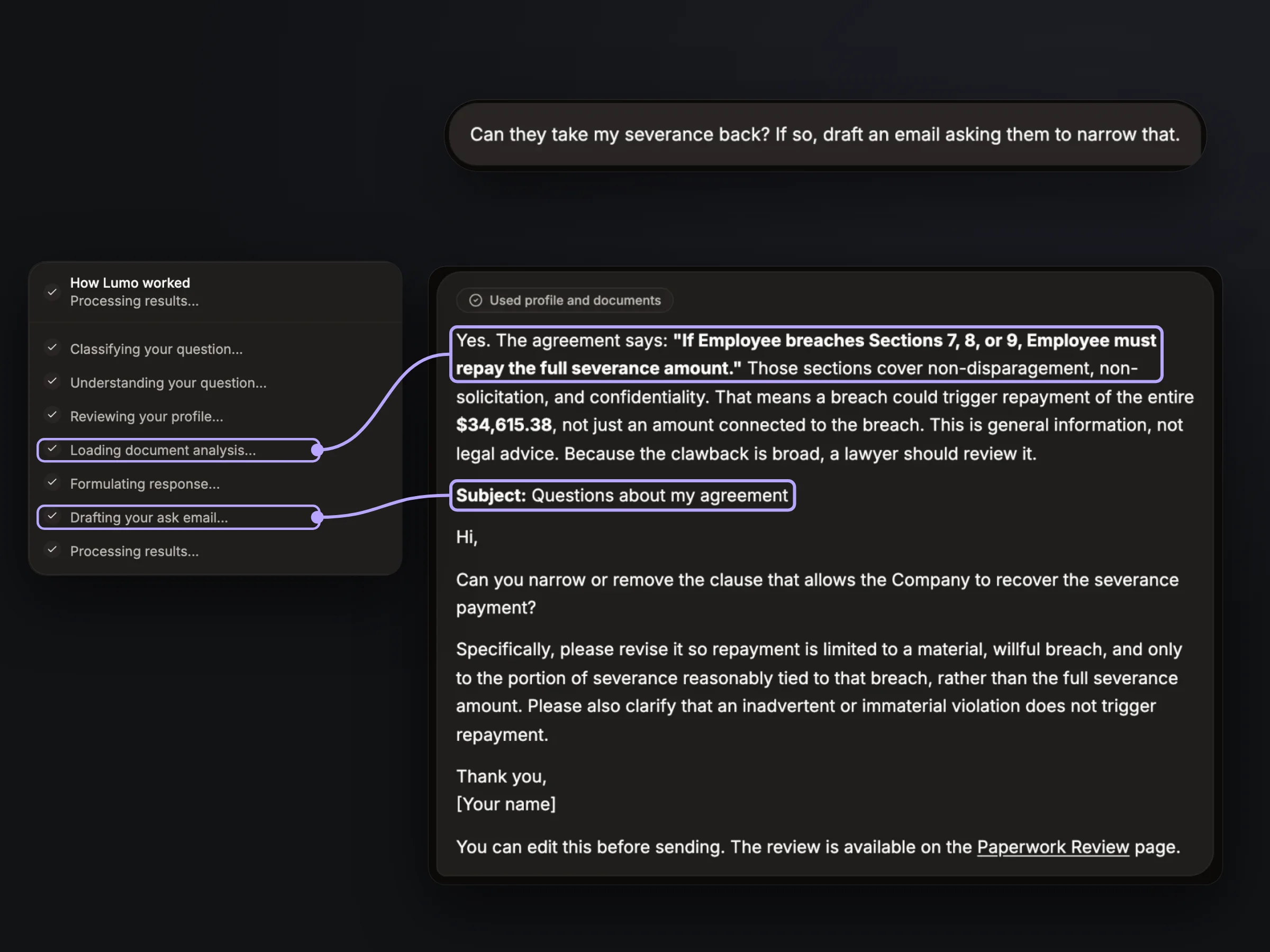
  • The guidance layer: LUMO, a context-aware AI layer that can suggest actions, explain next steps, and ask for confirmation before changing user data

‍

The goal was to move the experience from "use five tools and stitch the results together" to "start from one opportunity and build the right packet of support around it."

My Role

‍

I led the product and design direction end to end:

‍

  • Defined the product strategy and operating-system framing
  • Mapped the job-search workflow from setup to application execution to interview prep
  • Designed the core UX architecture across dashboard, applications, job packets, resume tailoring, ghost-job checks, LUMO, and interview prep
  • Designed AI workflows around user control, confirmation, context visibility, and risk gates
  • Built frontend flows and integrated with Supabase-backed product logic and Edge Functions
  • Shaped the brand and interface direction around calm, practical, emotionally aware execution
  • Used rapid AI-assisted development to prototype, validate, and iterate across a broad product surface
Key Workflow 1: Job Packet As The Role-Centered Organizing Object

‍

The Job Packet workflow is the clearest expression of the product thesis.

‍

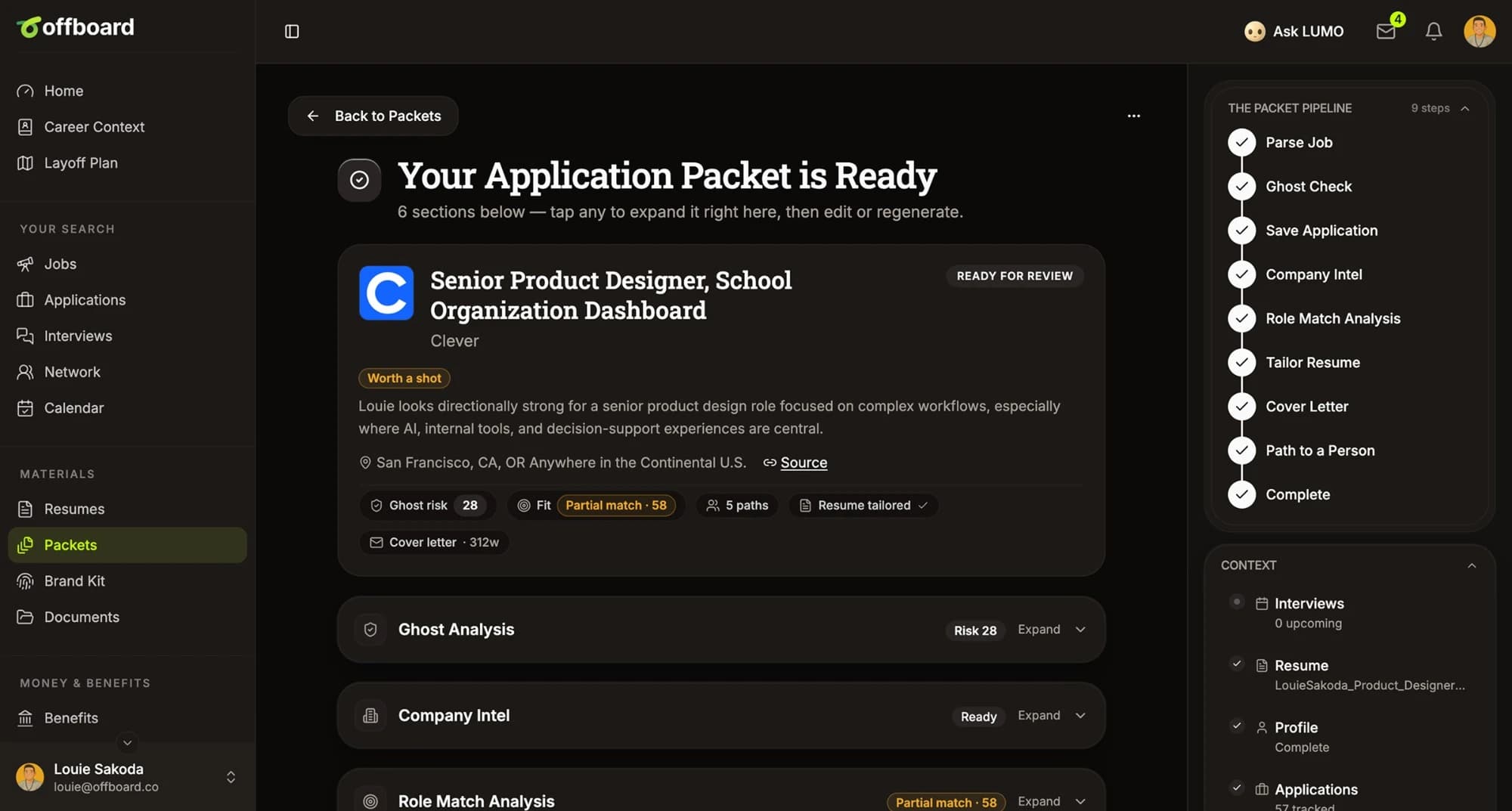
A user can paste a job URL or job description. Offboard then builds a role-specific packet through a connected pipeline:

  1. Parse the job
  2. Run a ghost-job check
  3. Pause at a risk gate if the posting looks risky
  4. Save or reuse the application
  5. Generate company intel
  6. Analyze role match
  7. Find or request a resume
  8. Create a tailored resume session
  9. Draft a cover letter
  10. Move the packet into review
Key Workflow 2: LUMO As A Context-Aware Guidance Layer

‍

LUMO is the AI layer that sits across the product.

‍

The goal was not to create a generic chat surface. LUMO should understand the user's real search context: profile, applications, interviews, network, reflections the user allows for personalization, and saved chat memory.

‍

LUMO can answer questions, suggest relevant tools, and propose actions like creating or updating an application or saving a contact. For actions that modify user data, the interface uses confirmation-first cards so the user sees exactly what will happen before approving it.

‍

Design decision: I made context and control central to the AI UX. The stronger the system gets at understanding the user's search, the more important it becomes to show what it knows, ask before changing data, and keep suggested actions grounded in existing workflows.

Design Principles

‍

1. Calm beats clever

The product is for people who may be anxious, tired, or overwhelmed. The interface needs to feel clear and steady. That shaped the language, density, and workflow rhythm: short next steps, visible status, quiet hierarchy, and practical calls to action.

‍

2. AI should preserve agency

The system can automate analysis, drafting, and organization, but it should not make irreversible decisions on the user's behalf. Confirmation cards, review flows, and risk gates make automation feel more trustworthy.

‍

3. The role is the anchor

Most job-search tools produce disconnected outputs. Offboard's workflows are designed to keep artifacts tied to the same role and company context. This makes the product feel cumulative instead of transactional.

‍

4. Context should compound

Every completed action should make the next action easier. A resume improves tailoring. A saved role improves interview prep. A ghost-job check informs whether to invest more time. LUMO becomes more useful as the workspace fills in.

‍

5. Progress should feel operational, not performative

The dashboard uses checklist progress, pipeline status, packets, and upcoming events. These are practical signals, not artificial achievement loops.

‍

Design decision: I made context and control central to the AI UX. The stronger the system gets at understanding the user's search, the more important it becomes to show what it knows, ask before changing data, and keep suggested actions grounded in existing workflows.

Outcome

‍

Offboard is a working AI-native career transition product with shipped surfaces for dashboard guidance, applications, resume tailoring, ghost-job analysis, Job Packets, LUMO guidance, interview prep, documents, network, community, financial runway, and employer-sponsored support.

‍

What is publishable now:

‍

  • The product is more than a concept. It has a real React/Supabase application surface with working routed workflows.
  • The Job Packet pipeline connects parsing, validation, application creation, company intel, role match, resume tailoring, and cover letter generation.
  • LUMO is designed as a context-aware guidance layer with confirmation-first actions.
  • The core design strategy is grounded in reducing scattered job-search work into a role-centered operating system.
AI legal consultant

AI Legal Consultant

'We Are Not Lawyers' is an AI-native platform that turns confusing legal problems into clear, step-by-step actions through guided workflows, documents, and optional attorney handoff.

Case Study Coming Soon

Lumo - Jobseeker Companion

Lorem ipsum dolor sit amet, consectetur adipiscing elit.

Project Overview

‍

Flexi is an AI-powered digital tutor designed for CK-12 Foundation’s educational platform, offering personalized, on-demand academic support for K-12 students. By delivering explanations, adaptive practice, and encouragement, Flexi addresses critical learning gaps, particularly in remote or hybrid classroom settings.

‍

  • My Role: Senior Product Designer (User Research, UX/UI Design, Prototyping)
  • Timeline: January 2024 – September 2024 (Beta), Public launch Q1 2025
  • Team: 1 PM, 3 ML Engineers, 2 Curriculum Specialists, 1 Front-End Developer

‍

‍

‍

Problem & Opportunity

‍

The shift to remote learning revealed significant gaps in personalized student support:

‍

  • Only 50% of students could consistently focus during remote lessons, with just 41% feeling motivated (YouthTruth, 2022).
  • Teachers experienced burnout from repetitive student queries, averaging 54-hour workweeks, with less than half dedicated to teaching (Education Week, 2022).
  • Effective 1:1 tutoring remains prohibitively expensive despite proven efficacy, delivering +0.20 to 0.23 standard deviation improvements in math (NBER, 2022).

‍

Opportunity: Build a scalable AI tutoring tool integrated into existing classroom workflows, offering affordable, trustworthy, always-available learning support.

‍

‍

‍

User Research & Methodology

‍

We employed a variety of rigorous research methodologies to ensure our solutions directly addressed real user needs:

‍

  • Student Interviews (Grades 6-11, n=18): Conducted qualitative 1-on-1 video interviews to deeply understand students' emotional responses, frustrations, and expectations when seeking help.
  • Teacher Diary Studies (n=12, two-week duration): Teachers documented daily interactions, highlighting repetitive support tasks and workload impacts.
  • Competitive Analysis: Systematic assessment of 5 leading AI tutoring products, evaluating usability, transparency, teacher integration, and trustworthiness.

‍

Key findings:

‍

  • 67% of students reported frustration without immediate help.
  • Teachers spent ~7 hours weekly addressing routine clarifications.
  • Competitors lacked transparency, teacher oversight, and trust-building features.

‍

‍

Design & Prototyping

‍

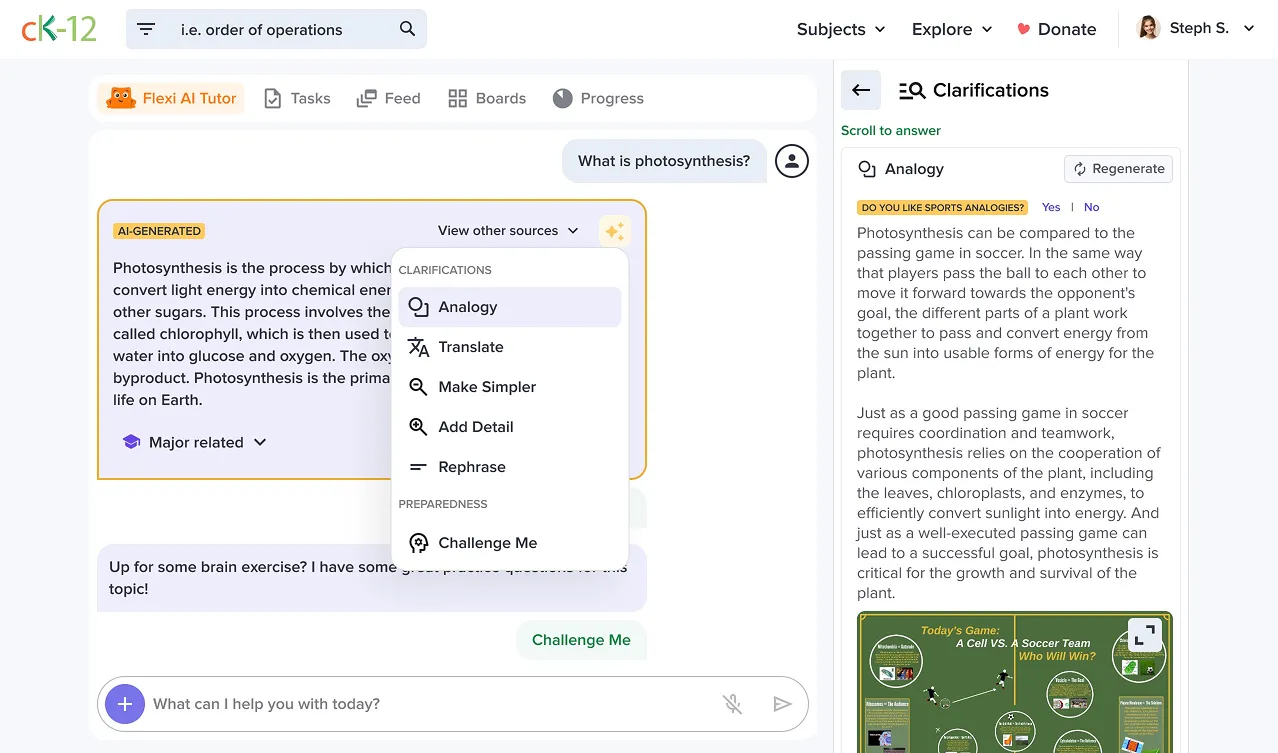
Based on research, we developed a conversational, supportive user interface emphasizing transparency and accessibility:

‍

  • Confidence Indicators: Real-time display of AI confidence levels, increasing trust and clarity.
  • Interactive Learning Loop: Answer → Micro-quiz → Stretch-prompt, promoting deeper learning and engagement.
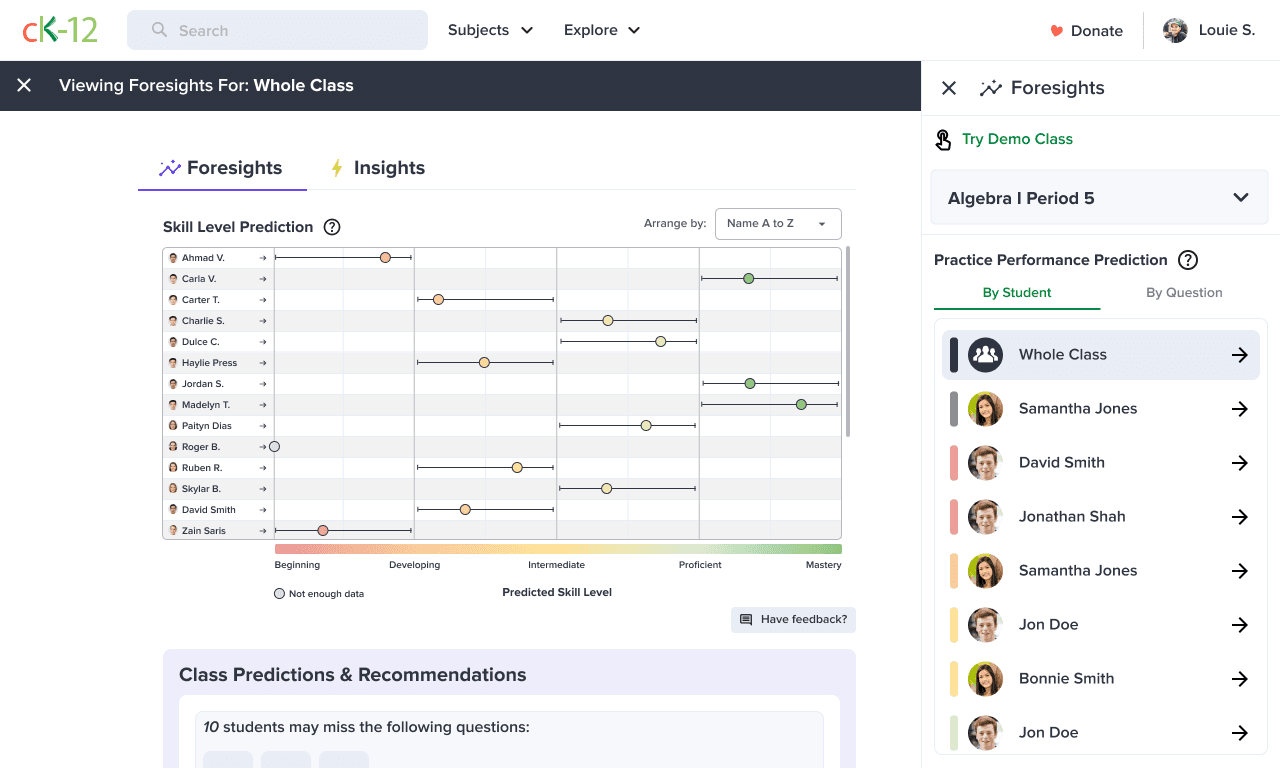
  • Teacher Dashboard: Real-time analytics highlighting common student misconceptions, streamlining teacher interventions.

‍

Through iterative Figma prototyping and usability testing (n=31), we achieved:

‍

  • 22% faster task completion compared to traditional worksheets.
  • 92% student satisfaction rate, measured by willingness to use the tool again.

‍

‍

AI Integration & Design Decisions

‍

Strategic AI design choices were grounded in evidence and aligned with user needs:

‍

  • Transparency & Trust: Displayed model confidence and source citations, crucial for sustained trust (Meta-review of Intelligent Tutoring Systems, 2023).
  • Promoting Metacognition: Implemented "think-aloud" checkboxes, shown to boost engagement and retention during remote learning.
  • Teacher Empowerment: Added teacher-controlled toggles (e.g., "Pause Flexi," "Rephrase Response"), reducing teacher workload and enhancing control.

‍

‍

Pilot Results & Impact

‍

Flexi’s pilot launch demonstrated significant improvements across key metrics:

‍

  • User Engagement: Weekly active users hit 61% of the target cohort within eight weeks.
  • Session Duration: Average session length more than doubled, from 5m 22s to 10m 48s.
  • Learning Gains: Accuracy on follow-up tasks improved significantly, rising from 48% to 72% correct responses.
  • Teacher Workload: Support requests decreased by 33% per student per term.

‍

Flexi’s initial success projects substantial long-term educational benefits:

‍

  • Estimated to save approximately 1.9 teacher-hours per class weekly, equating to nearly $2,400 saved per teacher each semester.
  • Achieved an estimated learning improvement of +0.18 standard deviations, comparable to traditional human tutoring at a fraction of the cost.

‍

Post-launch, Flexi recorded over 500,000 student sessions within 90 days, solidifying its value to CK-12’s expansive user base.

‍

‍

Reflection & Future Vision

‍

The Flexi project reinforced critical lessons in designing responsible and effective AI educational tools:

‍

  • Successful: Confidence indicators, micro-quizzes, and teacher empowerment controls resonated positively.
  • Areas to Improve: Early avatar designs felt overly juvenile to older students; future iterations will embrace a more universally appealing aesthetic.

‍

Looking ahead, we plan to expand Flexi's capabilities:

‍

  • Multilingual Support: Broadening global accessibility.
  • Adaptive Content: Adjusting complexity based on individual reading levels.
  • Enhanced Analytics: Providing district-wide insights through API integrations.

‍

ai student tutor

The World’s Most Powerful AI Tutor

Your Math and Science tutor that is always there for you, and is absolutely FREE.

Case Study Coming Soon

Flexi - AI Student Tutor

Lorem ipsum dolor sit amet, consectetur adipiscing elit.

Project Overview

‍

Flexi is an AI-powered digital tutor designed for CK-12 Foundation’s educational platform, offering personalized, on-demand academic support for K-12 students. By delivering explanations, adaptive practice, and encouragement, Flexi addresses critical learning gaps, particularly in remote or hybrid classroom settings.

‍

  • My Role: Senior Product Designer (User Research, UX/UI Design, Prototyping)
  • Timeline: January 2024 – September 2024 (Beta), Public launch Q1 2025
  • Team: 1 PM, 3 ML Engineers, 2 Curriculum Specialists, 1 Front-End Developer

‍

‍

‍

Problem & Opportunity

‍

The shift to remote learning revealed significant gaps in personalized student support:

‍

  • Only 50% of students could consistently focus during remote lessons, with just 41% feeling motivated (YouthTruth, 2022).
  • Teachers experienced burnout from repetitive student queries, averaging 54-hour workweeks, with less than half dedicated to teaching (Education Week, 2022).
  • Effective 1:1 tutoring remains prohibitively expensive despite proven efficacy, delivering +0.20 to 0.23 standard deviation improvements in math (NBER, 2022).

‍

Opportunity: Build a scalable AI tutoring tool integrated into existing classroom workflows, offering affordable, trustworthy, always-available learning support.

‍

‍

‍

User Research & Methodology

‍

We employed a variety of rigorous research methodologies to ensure our solutions directly addressed real user needs:

‍

  • Student Interviews (Grades 6-11, n=18): Conducted qualitative 1-on-1 video interviews to deeply understand students' emotional responses, frustrations, and expectations when seeking help.
  • Teacher Diary Studies (n=12, two-week duration): Teachers documented daily interactions, highlighting repetitive support tasks and workload impacts.
  • Competitive Analysis: Systematic assessment of 5 leading AI tutoring products, evaluating usability, transparency, teacher integration, and trustworthiness.

‍

Key findings:

‍

  • 67% of students reported frustration without immediate help.
  • Teachers spent ~7 hours weekly addressing routine clarifications.
  • Competitors lacked transparency, teacher oversight, and trust-building features.

‍

‍

Design & Prototyping

‍

Based on research, we developed a conversational, supportive user interface emphasizing transparency and accessibility:

‍

  • Confidence Indicators: Real-time display of AI confidence levels, increasing trust and clarity.
  • Interactive Learning Loop: Answer → Micro-quiz → Stretch-prompt, promoting deeper learning and engagement.
  • Teacher Dashboard: Real-time analytics highlighting common student misconceptions, streamlining teacher interventions.

‍

Through iterative Figma prototyping and usability testing (n=31), we achieved:

‍

  • 22% faster task completion compared to traditional worksheets.
  • 92% student satisfaction rate, measured by willingness to use the tool again.

‍

‍

AI Integration & Design Decisions

‍

Strategic AI design choices were grounded in evidence and aligned with user needs:

‍

  • Transparency & Trust: Displayed model confidence and source citations, crucial for sustained trust (Meta-review of Intelligent Tutoring Systems, 2023).
  • Promoting Metacognition: Implemented "think-aloud" checkboxes, shown to boost engagement and retention during remote learning.
  • Teacher Empowerment: Added teacher-controlled toggles (e.g., "Pause Flexi," "Rephrase Response"), reducing teacher workload and enhancing control.

‍

‍

Pilot Results & Impact

‍

Flexi’s pilot launch demonstrated significant improvements across key metrics:

‍

  • User Engagement: Weekly active users hit 61% of the target cohort within eight weeks.
  • Session Duration: Average session length more than doubled, from 5m 22s to 10m 48s.
  • Learning Gains: Accuracy on follow-up tasks improved significantly, rising from 48% to 72% correct responses.
  • Teacher Workload: Support requests decreased by 33% per student per term.

‍

Flexi’s initial success projects substantial long-term educational benefits:

‍

  • Estimated to save approximately 1.9 teacher-hours per class weekly, equating to nearly $2,400 saved per teacher each semester.
  • Achieved an estimated learning improvement of +0.18 standard deviations, comparable to traditional human tutoring at a fraction of the cost.

‍

Post-launch, Flexi recorded over 500,000 student sessions within 90 days, solidifying its value to CK-12’s expansive user base.

‍

‍

Reflection & Future Vision

‍

The Flexi project reinforced critical lessons in designing responsible and effective AI educational tools:

‍

  • Successful: Confidence indicators, micro-quizzes, and teacher empowerment controls resonated positively.
  • Areas to Improve: Early avatar designs felt overly juvenile to older students; future iterations will embrace a more universally appealing aesthetic.

‍

Looking ahead, we plan to expand Flexi's capabilities:

‍

  • Multilingual Support: Broadening global accessibility.
  • Adaptive Content: Adjusting complexity based on individual reading levels.
  • Enhanced Analytics: Providing district-wide insights through API integrations.

‍

© 2026 Louie Sakoda. All rights reserved.
Privacy Policy Terms of Service Cookies Settings